
Jump Ahead Too
ToggleInteractive Digital Signage Solutions Australia — Commercial Collaboration & Engagement Systems
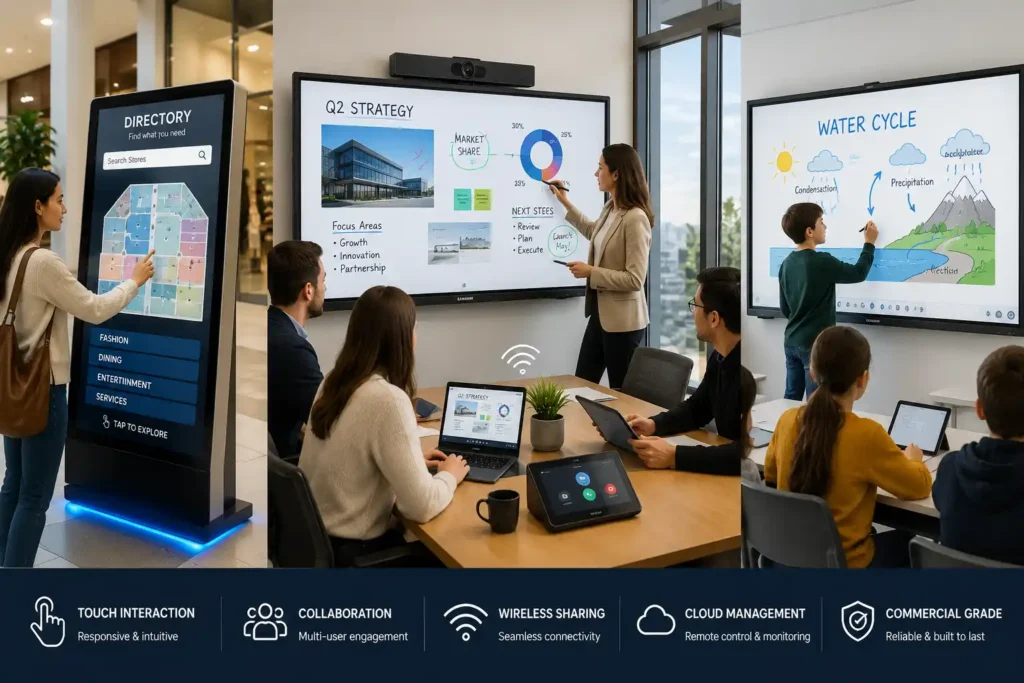
Interactive digital signage transforms traditional passive displays into responsive customer engagement, collaboration, self-service, and communication environments across retail, hospitality, education, healthcare, corporate, and public-facing commercial deployments.
Modern interactive commercial display systems commonly utilise touchscreen technologies including PCAP and IR touch systems, cloud-managed collaboration ecosystems, wireless presentation platforms, wayfinding systems, and real-time customer interaction environments designed to improve engagement and operational efficiency.
Commercial interactive signage deployments may range from customer-facing self-service kiosks and digital wayfinding systems through to advanced collaboration environments supporting hybrid meetings, multi-user annotation, Microsoft Teams Rooms integration, and enterprise-wide content management capability.
Kickstart Computers supplies commercial interactive signage solutions Australia-wide across Samsung Flip Pro, Samsung WAD eBoard, Yealink MeetingBoard, Promethean interactive displays, touchscreen kiosks, collaboration environments, and enterprise interactive display ecosystems depending on deployment requirements and long-term operational suitability.
Explore Related Commercial Display Solutions
Interactive digital signage deployments are often implemented alongside commercial display systems including video walls, digital menu boards, outdoor signage solutions, and professional business communication platforms depending on customer engagement goals, collaboration requirements, and long-term deployment environments.
Businesses researching interactive commercial displays may also evaluate high-brightness signage systems, large-format communication displays, hospitality menu boards, and commercial digital signage ecosystems depending on audience interaction requirements and operational workflows.
Commercial Digital Signage Displays
Professional commercial signage displays designed for business communication, customer engagement, retail environments, and high-visibility information delivery.

Commercial Video Walls
Large-format multi-display communication systems designed for immersive collaboration environments, public engagement, and large-scale visual communication.
Digital Menu Boards
Interactive hospitality display solutions designed for menu scheduling, customer communication, ordering environments, and dynamic promotional content.

Outdoor Digital Signage
High-brightness outdoor commercial signage systems designed for public communication, wayfinding environments, customer visibility, and weather-resistant deployments.
Interactive Digital Signage Solutions Australia
Interactive digital signage solutions are designed to transform traditional passive display environments into dynamic customer engagement, collaboration, and communication platforms across retail, hospitality, education, healthcare, corporate, and public-facing commercial environments.
Unlike standard commercial signage displays that primarily deliver scheduled messaging or promotional content, interactive signage systems allow users to actively engage with information through touchscreen interaction, self-service functionality, wayfinding systems, collaboration tools, and real-time communication experiences.
Modern interactive signage deployments may range from simple touchscreen directories and hospitality ordering systems through to advanced collaboration ecosystems supporting hybrid meetings, multi-user annotation, wireless sharing, and enterprise-wide content management platforms.
Many organisations researching interactive digital signage are often comparing:
- interactive kiosks vs interactive whiteboards
• touchscreen signage vs standard commercial displays
• Samsung Flip Pro vs Yealink MeetingBoard
• Android vs Windows collaboration ecosystems
• PCAP vs IR touch technologies
• SoC platforms vs Windows OPS systems
• customer engagement systems vs collaboration environments
While many interactive commercial displays may appear visually similar online, deployment suitability can vary significantly depending on touchscreen responsiveness, latency performance, operating systems, software ecosystems, commercial operating capability, durability, and long-term deployment scalability.
Since 2007, Kickstart Computers has supplied commercial interactive signage and collaboration solutions Australia-wide across Samsung, LG, Promethean, Yealink, Philips, BenQ, NEC, and other commercial display ecosystems depending on deployment requirements and project suitability.
Many commercial interactive signage deployments can also be supplied preconfigured and ready for straightforward deployment depending on software requirements, operating environments, and long-term operational goals.
Understanding Interactive Digital Signage
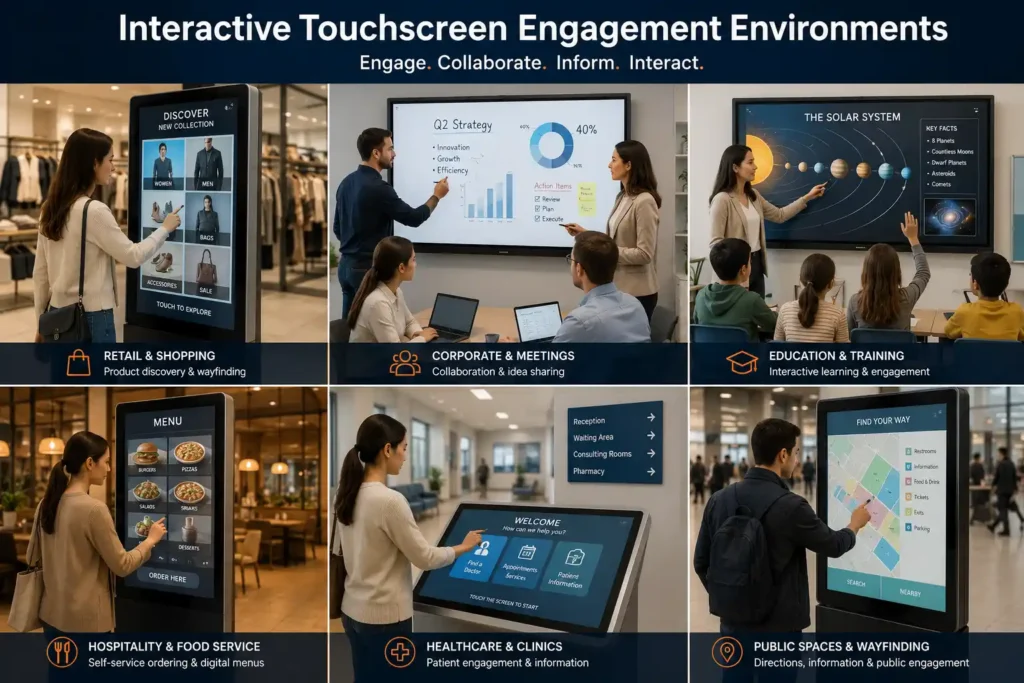
Interactive digital signage enables users to actively engage with digital content rather than simply viewing scheduled messaging or promotional displays. These systems are commonly designed to improve engagement, accessibility, collaboration, and operational efficiency across commercial environments where customer interaction or user participation forms part of the overall experience.
Modern interactive commercial deployments commonly integrate touchscreen technology, cloud-based content management systems, collaboration platforms, wireless presentation ecosystems, and self-service functionality to create more responsive communication environments.
Interactive digital signage solutions are now widely deployed across:
- retail customer engagement environments
• hospitality ordering systems
• healthcare directories and check-in systems
• education and classroom collaboration
• corporate meeting rooms
• public information and wayfinding systems
• self-service kiosk environments
Unlike standard signage displays, interactive systems often prioritise low-latency touch responsiveness, real-time interaction, software integration capability, and multi-user participation experiences.
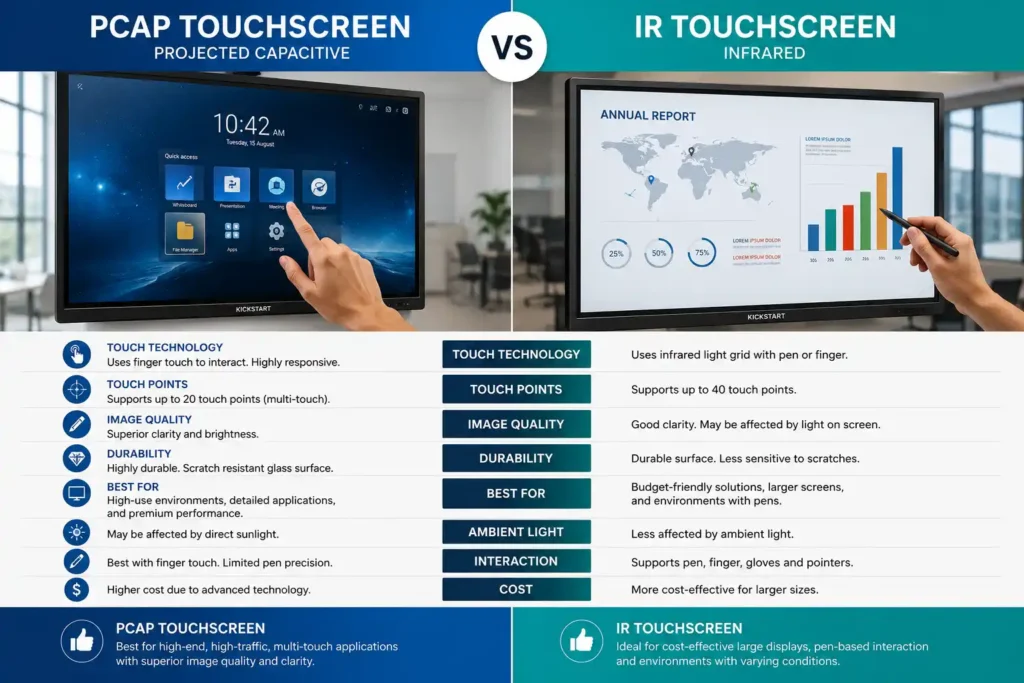
Premium touchscreen technologies such as Projected Capacitive (PCAP) systems are commonly designed to deliver highly responsive touch interaction with minimal latency, often targeting sub-10ms responsiveness within premium collaboration and kiosk environments.
For many organisations, selecting the correct interactive ecosystem from the beginning can significantly influence software compatibility, user experience quality, deployment scalability, and long-term operational suitability.
Interactive Display Technologies & Touchscreen Systems
Interactive digital signage deployments can vary significantly depending on touchscreen technology, operating systems, collaboration requirements, software ecosystems, and long-term deployment goals.
Different interactive display technologies are commonly designed to prioritise different strengths including touch responsiveness, scalability, annotation capability, self-service interaction, or enterprise collaboration functionality.
| Touch Technology | Common Advantages | Typical Environments | Commercial Considerations |
|---|---|---|---|
| Projected Capacitive (PCAP) |
Premium touch responsiveness Smooth gesture interaction Edge-to-edge touch capability |
Retail kiosks Premium collaboration Interactive directories |
Typically higher commercial pricing Premium touch experience Low-latency responsiveness |
| Infrared Touch (IR) |
Scalable large-format touch capability Multi-user interaction Cost-effective collaboration |
Classrooms Meeting rooms Interactive displays |
Touch frame visibility may vary Supports large display sizes |
| Interactive Whiteboards |
Annotation and collaboration Hybrid meeting support Wireless sharing |
Classrooms Boardrooms Training environments |
Software ecosystems may vary considerably Collaboration-focused deployments |
| Interactive Kiosks |
Self-service interaction Customer engagement Wayfinding systems |
Retail Hospitality Healthcare |
Vandal protection may be required Durability considerations become important |
Commercial interactive deployments may also differ considerably depending on whether the environment prioritises lightweight Android-based signage ecosystems or enterprise Windows collaboration environments.
Integrated SoC (System on Chip) platforms are commonly used within kiosk systems, signage deployments, and lightweight collaboration environments where simplified management and reduced hardware complexity are prioritised.
Windows OPS (Open Pluggable Specification) systems are more commonly deployed within enterprise collaboration environments requiring advanced software compatibility, Microsoft Teams Rooms integration, Zoom Rooms capability, or more demanding Windows-based workflows.
Additional Commercial Interactive Considerations
- Tempered safety glass for improved commercial durability
- Anti-microbial surface coatings for healthcare and public-facing environments
- 7H hardness durability for high-touch commercial deployments
- Vandal resistance for public interaction environments
- Commercial operating capability for extended daily use
- Remote management systems for multi-site deployment control
Interactive Digital Signage Applications & Commercial Environments
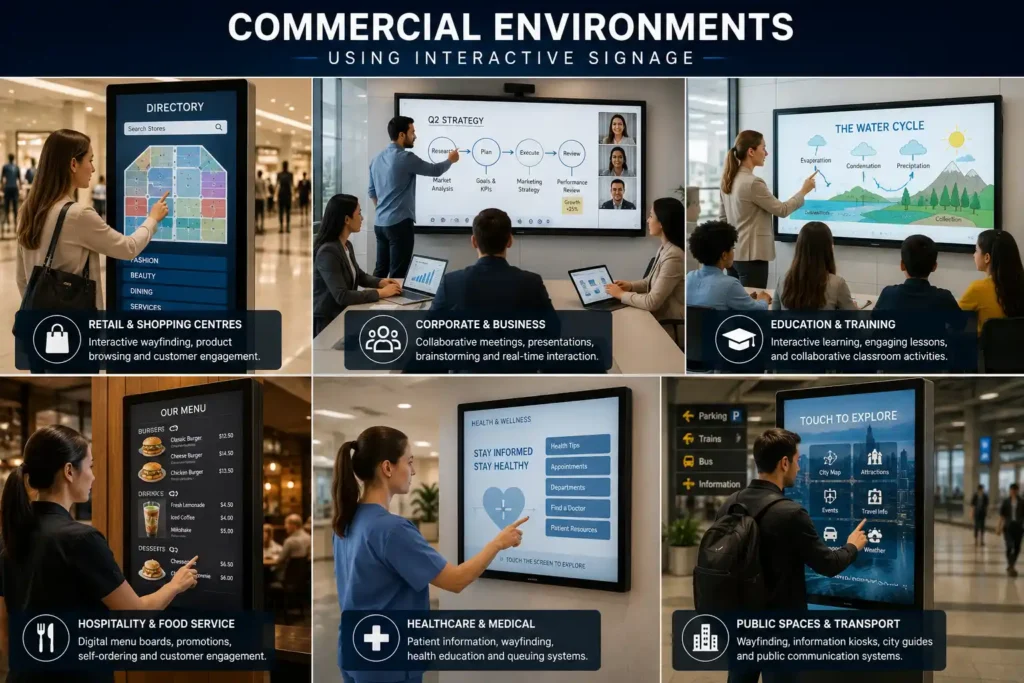
Interactive digital signage solutions are commonly deployed across a wide range of commercial environments depending on customer engagement goals, operational workflows, collaboration requirements, and audience interaction expectations.
Retail and hospitality environments often prioritise customer engagement, self-service interaction, ordering systems, and digital wayfinding capability designed to improve operational efficiency while enhancing customer experiences.
Corporate collaboration environments commonly focus more heavily on wireless presentation systems, hybrid meeting support, multi-user annotation, and integrated video conferencing capability across modern boardrooms and meeting spaces.
Education deployments frequently prioritise classroom collaboration, digital learning, annotation capability, and student engagement through interactive whiteboards and multi-user touchscreen environments.
Healthcare and public-facing deployments may additionally prioritise accessibility, wayfinding systems, touch durability, hygiene considerations, and simplified information accessibility across higher-traffic environments.
| Commercial Environment | Common Interactive Applications | Typical Priorities | Common Interactive Solutions |
|---|---|---|---|
| Retail |
Product discovery Customer engagement Self-service interaction |
Touch responsiveness Engagement analytics Customer interaction |
Interactive kiosks Touchscreen displays Wayfinding systems |
| Hospitality |
Ordering systems Menu interaction Customer communication |
Operational flexibility Easy content updates Faster customer interaction |
Interactive menu systems Self-service kiosks Digital menu boards |
| Corporate |
Collaboration Presentations Hybrid meetings |
Wireless sharing Annotation capability Video conferencing integration |
Yealink MeetingBoard Collaboration displays Interactive whiteboards |
| Education |
Digital learning Classroom engagement Annotation |
Multi-user interaction Collaboration ecosystems Student participation |
Samsung Flip Pro Promethean displays Interactive whiteboards |
| Healthcare |
Wayfinding Check-in systems Accessibility |
Reliability Hygiene considerations Simplified information access |
Interactive kiosks Touchscreen directories Patient engagement systems |
| Public Spaces |
Navigation Directories Information access |
Accessibility Durability Remote management |
Interactive wayfinding Public information kiosks Touchscreen directories |
Commercial Digital Kiosk Solutions
For businesses specifically exploring self-ordering terminals, wayfinding kiosks, check-in systems and freestanding interactive displays, our dedicated kiosk solutions page covers available hardware from Soniq, LG and Chief — including touch and non-touch configurations across countertop and freestanding formats suited to retail, hospitality, healthcare and public-facing environments.
Explore Commercial Kiosk Solutions →Modern Cloud-Managed Interactive Ecosystems
Many modern interactive signage deployments now operate as part of larger cloud-managed ecosystems capable of remotely updating content, monitoring devices, managing collaboration workflows, and supporting multi-site deployment scalability from centralised management platforms.
- Remote content management for multi-site deployments
- Cloud-based collaboration systems supporting hybrid environments
- Centralised device monitoring and operational visibility
- Wireless presentation ecosystems for meeting rooms and classrooms
- Enterprise signage scalability across multiple business locations
Remote Management, Software Ecosystems & Long-Term Scalability
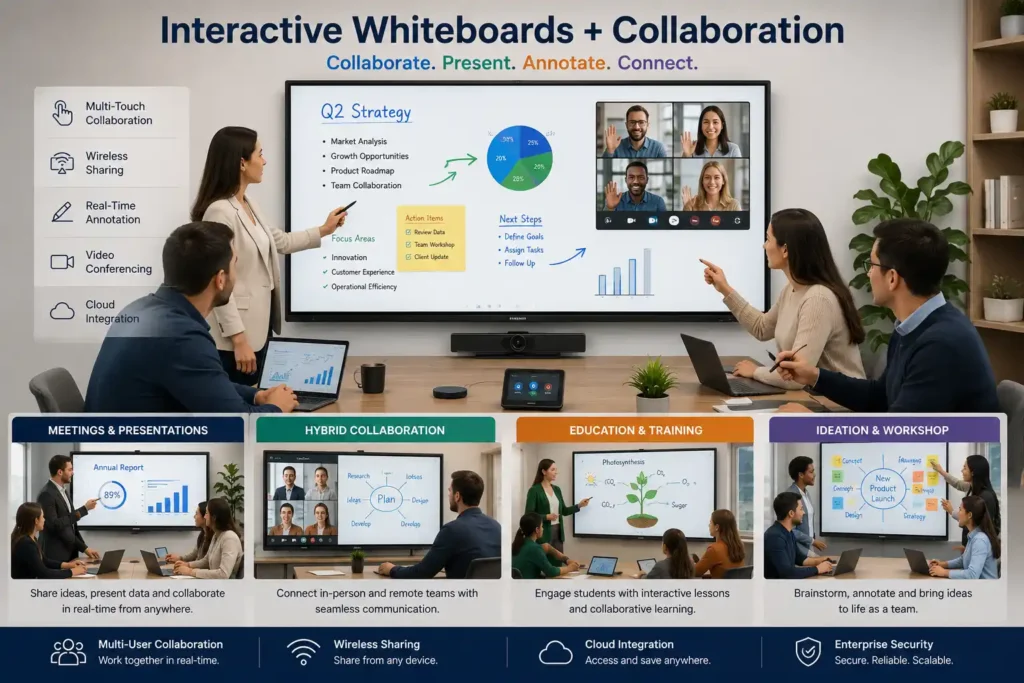
Modern interactive digital signage deployments commonly operate as part of larger connected ecosystems designed to support remote management, collaboration workflows, device monitoring, content scheduling, software administration, and long-term deployment scalability.
Many modern interactive displays now support integrated System on Chip (SoC) platforms capable of operating signage and collaboration applications directly from the display without requiring separate external media players or computing hardware.
Popular commercial ecosystems commonly include:
- Samsung Tizen
• LG webOS
• Android collaboration platforms
• Microsoft Teams Rooms
• Zoom Rooms
• cloud signage management platforms
Remote management capability may commonly support:
- centralised content updates
• collaboration management
• software administration
• remote troubleshooting
• display health monitoring
• scheduling and automation
• multi-site deployment management
For larger organisations operating multiple collaboration environments or interactive signage deployments, centralised management capability can significantly simplify operational workflows while improving deployment consistency across multiple business locations.
Interactive Whiteboards & Collaboration Displays
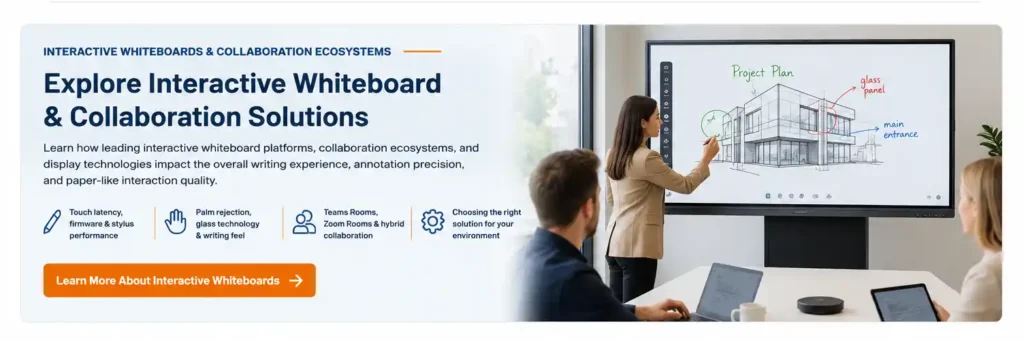
Explore Interactive Whiteboard & Collaboration Solutions
For businesses, schools and organisations evaluating dedicated interactive whiteboard platforms, our interactive whiteboard solutions page covers leading collaboration ecosystems including Samsung Flip Pro, Yealink MeetingBoard, Promethean, and Microsoft Teams Rooms — comparing touch technologies, glass bonding systems, writing latency, stylus performance and Android vs Windows deployment environments across education, corporate and hybrid meeting applications.
Explore Interactive Whiteboard Solutions →Businesses researching interactive collaboration environments may also evaluate dedicated interactive whiteboard systems designed for classrooms, hybrid meetings, boardrooms, training environments, and enterprise collaboration deployments.
Modern collaboration ecosystems may include Samsung Flip Pro, Yealink MeetingBoard, Promethean interactive displays, Microsoft Teams Rooms integrations, wireless presentation systems, and multi-user touchscreen collaboration platforms depending on operational workflows and deployment requirements.
Differences in touch latency, firmware optimisation, stylus responsiveness, palm rejection capability, glass technologies, and collaboration software ecosystems can significantly influence the overall writing experience, annotation responsiveness, and paper-like interaction quality across different commercial interactive display platforms. Learn more about selecting the right interactive whiteboard solution for classrooms, hybrid meetings, collaboration environments, and enterprise deployment requirements.
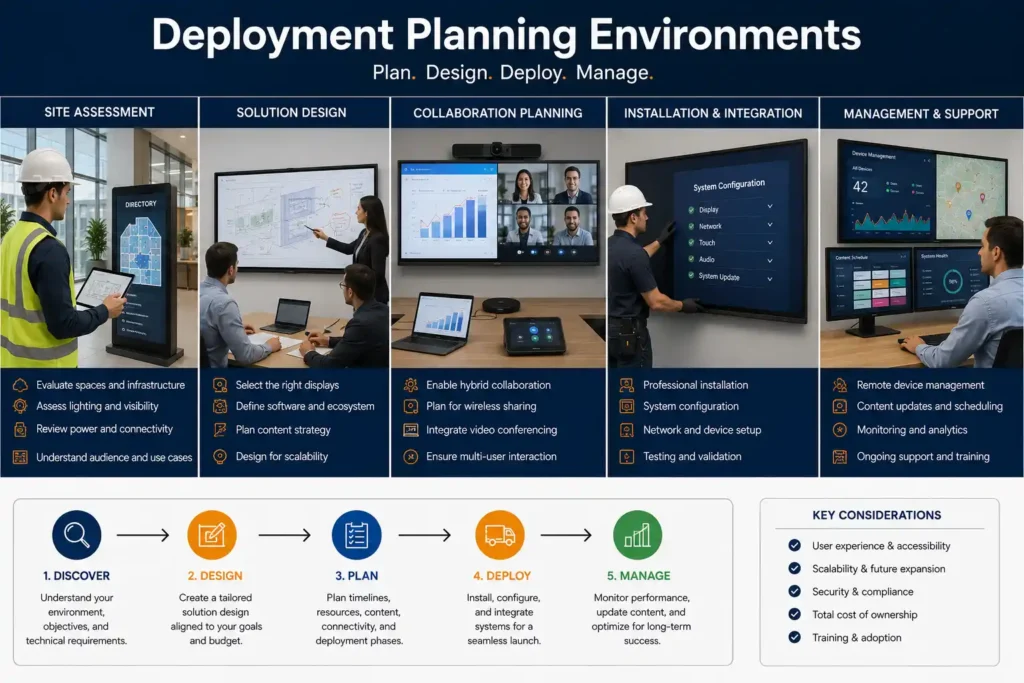
Interactive Digital Signage Planning & Deployment Considerations
Successful interactive digital signage deployments often depend on considerably more than simply selecting a touchscreen display.
Long-term deployment suitability may also be influenced by operating environments, user interaction expectations, software ecosystems, accessibility requirements, mounting environments, network infrastructure, and future scalability goals.
| Deployment Consideration | Why It Matters | Commercial Impact |
|---|---|---|
| Touch Responsiveness & Latency | Influences user experience quality and interaction fluidity | Affects customer engagement perception, collaboration workflows, and overall commercial usability |
| Software Ecosystem | Impacts compatibility, collaboration capability, and deployment scalability | Influences long-term workflows, platform integration, and operational flexibility |
| Accessibility & Placement | Improves usability, audience interaction, and touch accessibility | Supports broader audience access and improves commercial interaction environments |
| Network Infrastructure | Supports cloud collaboration systems and remote management capability | Improves deployment stability, remote updates, and operational consistency |
| Remote Management | Simplifies administration, monitoring, and content management workflows | Improves scalability across multi-site deployments and connected ecosystems |
| Durability & Hygiene | Improves long-term usability across higher-touch commercial environments | Supports healthcare, hospitality, retail, and public-facing deployments |
Future Scalability & Commercial Growth Planning
Businesses planning future expansion may additionally benefit from evaluating long-term operational scalability, software compatibility, collaboration ecosystems, and deployment flexibility during the initial planning stage rather than focusing solely on upfront hardware comparisons.
- Cloud collaboration ecosystems supporting connected business environments
- Multi-site deployment scalability for growing organisations
- Wireless presentation capability across classrooms and meeting spaces
- Customer engagement analytics for interactive commercial environments
- Software integration requirements for long-term compatibility
- Long-term support environments for evolving operational workflows
Frequently Asked Questions About Interactive Digital Signage
Interactive digital signage allows users to actively engage with digital content through touchscreen interaction rather than simply viewing passive advertising or scheduled messaging. Unlike standard digital signage, interactive systems are designed to improve customer engagement, collaboration, self-service interaction, and information accessibility across commercial environments.
Modern interactive signage deployments commonly include:
• touchscreen kiosks
• interactive whiteboards
• digital directories
• self-service ordering systems
• collaboration displays
• wayfinding systems
Interactive digital signage is now widely deployed across retail, hospitality, healthcare, education, corporate, and public-facing commercial environments.
Standard digital signage is primarily designed for passive content delivery such as advertising, announcements, promotions, and scheduled messaging. Interactive digital signage allows users to actively engage with content through touchscreen interaction, annotation capability, self-service systems, collaboration tools, and real-time communication workflows.
As a general commercial comparison:
• standard signage focuses on viewing content
• interactive signage focuses on participation and engagement
Interactive deployments may additionally support:
• customer self-service
• digital wayfinding
• hybrid meetings
• wireless collaboration
• classroom interaction
• touchscreen ordering systems
Projected Capacitive (PCAP) and Infrared (IR) are two of the most common touchscreen technologies used within commercial interactive display environments. While both support touchscreen interaction, they are commonly designed for different deployment priorities and user experiences.
PCAP touch technology is commonly preferred within premium commercial environments because it delivers highly responsive, low-latency touch interaction — often targeting sub-10ms responsiveness for a smoother smartphone-like experience.
PCAP deployments commonly prioritise:
• premium touch responsiveness
• smooth gesture interaction
• edge-to-edge touch capability
• lower touch latency
• premium collaboration environments
IR touch technology is more commonly prioritised within larger-format collaboration environments where scalability and multi-user interaction become more important.
IR deployments commonly prioritise:
• larger interactive display sizes
• multi-user interaction
• cost-effective collaboration
• classrooms and meeting rooms
• large-format touch environments
As a general commercial guideline:
• PCAP commonly delivers the more premium touch experience
• IR commonly becomes more cost-effective for larger collaboration displays
Many modern interactive signage systems can operate using integrated Android or SoC (System on Chip) platforms without requiring dedicated external PCs. However, software requirements may vary considerably depending on deployment goals, collaboration workflows, and operating environments.
Interactive deployments may commonly utilise:
• cloud signage platforms
• collaboration software
• Teams Rooms systems
• Zoom Rooms environments
• kiosk management software
• wayfinding platforms
• wireless presentation systems
Enterprise collaboration environments may additionally utilise Windows OPS (Open Pluggable Specification) systems for advanced software compatibility and enterprise workflow integration.
Integrated SoC (System on Chip) platforms allow commercial interactive displays to operate signage and collaboration applications directly from the display without requiring separate computing hardware. These environments are commonly designed to simplify deployment while reducing hardware complexity and power consumption.
SoC environments commonly prioritise:
• simplified deployment
• reduced hardware complexity
• kiosk environments
• lightweight collaboration systems
• energy-efficient signage applications
Windows OPS (Open Pluggable Specification) systems are modular Windows computing environments commonly used within enterprise collaboration deployments requiring advanced software compatibility and Windows-based workflows.
OPS deployments commonly prioritise:
• Microsoft Teams Rooms
• Zoom Rooms
• advanced collaboration software
• enterprise workflows
• Windows application compatibility
As a general commercial guideline:
• SoC systems commonly suit lightweight signage and collaboration environments
• OPS systems commonly suit enterprise collaboration and advanced Windows-based deployments
Yes. Many modern interactive signage deployments now support cloud-based remote management ecosystems designed to simplify content administration, software updates, monitoring, scheduling, and multi-site deployment scalability.
Remote management systems may commonly support:
• centralised content updates
• device monitoring
• scheduling and automation
• remote troubleshooting
• collaboration management
• software administration
• multi-site deployment control
Cloud-managed ecosystems can become particularly valuable for organisations operating multiple classrooms, meeting spaces, retail locations, or customer engagement environments.
Commercial interactive displays are commonly engineered for significantly heavier usage environments compared to standard consumer touchscreen products. Public-facing deployments may require additional durability, hygiene protection, and commercial operating capability depending on deployment conditions.
Commercial interactive environments may commonly prioritise:
• tempered safety glass
• 7H hardness durability
• anti-microbial surface coatings
• commercial operating capability
• vandal resistance
• extended daily operating environments
Healthcare, hospitality, retail, and education deployments may additionally prioritise hygiene capability, touch durability, and long-term operational reliability.
Interactive digital signage solutions are now widely deployed across many commercial industries depending on customer engagement goals, collaboration requirements, and operational workflows.
Common deployment environments include:
• retail stores
• hospitality venues
• healthcare environments
• classrooms and education
• corporate meeting rooms
• public information systems
• government facilities
• transportation environments
Interactive deployments may support:
• customer engagement
• collaboration workflows
• digital wayfinding
• hybrid meetings
• self-service systems
• real-time communication environments
Interactive whiteboards are commonly designed for collaboration-focused environments such as classrooms, meeting rooms, training spaces, and hybrid work environments. Interactive kiosks are more commonly designed for customer engagement and self-service interaction within retail, hospitality, healthcare, and public-facing commercial deployments.
Interactive whiteboards commonly prioritise:
• collaboration
• annotation
• wireless presentation
• hybrid meetings
• classroom interaction
Interactive kiosks commonly prioritise:
• customer interaction
• wayfinding
• ordering systems
• information accessibility
• public engagement
As a general commercial guideline, interactive whiteboards are commonly better suited to collaboration environments, while interactive kiosks are more commonly designed for customer-facing interaction and self-service workflows.
Yes, however outdoor interactive digital signage deployments commonly require considerably more environmental engineering compared to indoor touchscreen systems. Outdoor interactive environments may require high-brightness commercial panels, weather-resistant enclosures, thermal management systems, and IP-rated environmental protection depending on deployment conditions.
Outdoor interactive signage deployments may commonly prioritise:
• high-brightness visibility
• weather resistance
• IP65/IP66 protection
• thermal cooling systems
• vandal resistance
• sunlight readability
Businesses considering outdoor touchscreen deployments are welcome to explore our dedicated Outdoor Digital Signage guide for more detailed information regarding outdoor brightness requirements, thermal management, environmental protection, and long-term deployment considerations.
Selecting the correct interactive signage solution often depends on considerably more than simply comparing display sizes or pricing. Long-term deployment suitability may also depend on touchscreen responsiveness, software ecosystems, collaboration requirements, scalability goals, and operational workflows.
Businesses commonly evaluate:
• touch responsiveness and latency
• software ecosystems
• collaboration requirements
• operating environments
• deployment scalability
• remote management capability
• durability requirements
• cloud integration capability
As a general commercial guideline:
• retail and hospitality deployments commonly prioritise engagement and self-service functionality
• education and corporate deployments commonly prioritise collaboration and presentation capability
• healthcare and public-facing environments commonly prioritise accessibility, durability, and wayfinding capability
Need Help Selecting The Right Interactive Digital Signage Solution?
Interactive digital signage deployments can vary considerably depending on touchscreen technology, collaboration requirements, software ecosystems, operating environments, and long-term scalability goals.
Whether you're researching touchscreen kiosks, interactive whiteboards, Samsung Flip Pro collaboration systems, Yealink MeetingBoard environments, customer engagement platforms, classroom collaboration displays, or enterprise touchscreen ecosystems, Kickstart Computers can help simplify the process by recommending commercial solutions suited to your deployment environment and operational requirements.
Businesses researching interactive collaboration systems, touchscreen kiosks, hybrid meeting environments, classroom displays, and customer engagement platforms are welcome to contact Kickstart Computers for guidance regarding deployment suitability, commercial pricing, software ecosystems, and Australia-wide availability.