samsung-flip
Samsung Flip Pro Interactive Displays
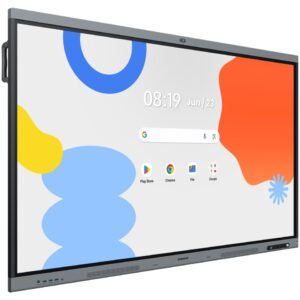
Samsung Flip Pro is Samsung's purpose-built collaboration display — a digital whiteboard, wireless sharing screen, and video conferencing display in one. Designed for meeting rooms, boardrooms, and education environments where people need to work together, not just watch a screen.
Kickstart Computers supplies Samsung Flip Pro interactive displays throughout Australia for corporate meeting rooms, education classrooms, and hybrid working environments.
What Is Samsung Flip Pro?
Samsung Flip Pro is a large-format interactive display that replaces three things at once — the whiteboard, the projector screen, and the presentation display. It is a touchscreen that anyone in the room can write on directly, a wireless receiver that mirrors content from any laptop, phone, or tablet, and a video conferencing screen that connects to Microsoft Teams or Zoom. Everything in one chassis, wall-mounted or on a mobile stand.
Where a digital signage screen broadcasts content at people, Flip Pro is a tool that people actively use. That distinction matters for procurement — if your requirement is displaying menus, promotions, or announcements, digital signage is the right product. If your requirement is a meeting room or classroom where people collaborate, annotate, and share, Flip Pro is built for that job.
If your requirement is broadcasting content to people passing by or sitting in a waiting area — retail screens, reception displays, menu boards, wayfinding — Samsung digital signage is the correct product. If your requirement is a space where people actively collaborate, present, and annotate together, Samsung Flip Pro is the right choice. Both live under the Samsung commercial display family — the job they do is what separates them.
Samsung Flip Pro Use Cases
Flip Pro is deployed across four primary environments in Australian businesses and schools — each of which benefits from a different aspect of the display's capability.
Corporate Meeting Rooms
Replaces whiteboards and projectors. Wireless sharing from any device, touchscreen annotation over presentations, and session export so decisions and diagrams aren't lost when the meeting ends.
Boardrooms
Pairs with Microsoft Teams or Zoom for hybrid meetings. Remote participants see and interact with the same canvas as people in the room — reducing the gap between in-person and remote collaboration.
Training Rooms
Trainers annotate over content in real time, switch between sources without a laptop, and export session notes directly to participants at the end — no photographing a whiteboard required.
Education Classrooms
Teachers write, draw, import worksheets, and display student work on a large interactive surface. The touch interface is intuitive enough for students to interact with content directly.
Samsung Flip Pro vs Digital Signage — Which Do You Need?
The most common question when researching Samsung Flip Pro is how it differs from Samsung's signage range. The table below maps common requirements to the right product.
| Requirement | Best Samsung Product |
|---|---|
| Retail advertising & promotions | Samsung Digital Signage → |
| Reception & lobby displays | Samsung Digital Signage → |
| Menu boards & QSR | Samsung Digital Signage → |
| Meeting room collaboration | Samsung Flip Pro ✓ |
| Boardroom video conferencing | Samsung Flip Pro ✓ |
| Classroom teaching | Samsung Flip Pro ✓ |
| Training & workshops | Samsung Flip Pro ✓ |
| Large venue & video walls | Samsung The Wall → |
Samsung Flip Pro Models & Sizes
Samsung Flip Pro is available in two screen sizes, with optional mounting and accessory configurations to suit different room types and installation requirements.
| Model | Screen Size | Best For | Mounting |
|---|---|---|---|
| Samsung Flip Pro 55" | 55 inches | Small to medium meeting rooms, huddle spaces, classrooms | Wall mount or mobile stand |
| Samsung Flip Pro 65" | 65 inches | Medium to large meeting rooms, boardrooms, training rooms | Wall mount or mobile stand |
Both sizes support the same full feature set — touchscreen whiteboarding, wireless sharing, Teams and Zoom compatibility. Size selection is driven by room dimensions and viewing distance. Talk to us if you need help choosing.
Samsung Flip Pro — Frequently Asked Questions
Samsung Flip Pro is a large-format interactive display designed for collaboration in meeting rooms, boardrooms, and education environments. It combines a touchscreen whiteboard, wireless content sharing, and video conferencing compatibility in a single display — replacing a whiteboard, projector screen, and presentation display simultaneously.
Yes. Samsung Flip Pro is compatible with Microsoft Teams for video conferencing. Participants in the room and remote attendees can both see and interact with content on the Flip Pro display during a Teams call.
Yes — that is one of its primary use cases. Samsung Flip Pro includes a built-in digital whiteboarding tool that allows users to write, draw, and annotate directly on the screen with a stylus or finger. Session content can be exported and shared with participants at the end of the meeting, eliminating the need to photograph a physical whiteboard.
Samsung Flip Pro is available in 55-inch and 65-inch screen sizes. Both sizes support the same feature set — touchscreen whiteboarding, wireless sharing, and Teams and Zoom compatibility. Size selection is typically driven by room size and viewing distance.
Samsung digital signage displays are one-way broadcast screens that play content to an audience — used in retail, reception areas, restaurants, and public spaces. Samsung Flip Pro is a two-way interactive display designed for active collaboration. Both are Samsung commercial displays but they serve entirely different purposes.
Yes. Samsung Flip Pro supports Zoom Rooms in addition to Microsoft Teams, making it compatible with both of the most widely deployed video conferencing platforms in Australian businesses.
Why Buy Samsung Flip Pro Through Kickstart Computers?
Kickstart Computers supplies Samsung Flip Pro interactive displays to Australian businesses, schools, and government organisations Australia-wide.
Room Sizing Advice
55" or 65" — we help you choose the right size for your room dimensions and typical viewing distance before you order.
Full Samsung Range
If you also need cameras, audio, or video conferencing hardware for the same room, we supply Yealink, Logitech, and Poly alongside Flip Pro.
Australia-Wide Supply
We supply Samsung Flip Pro to every state and territory — single units and multi-room orders handled with the same process.
Pre-Purchase Support
Talk to us about your room, your platform (Teams or Zoom), and your mounting requirements before you commit to hardware.
Part of the Samsung commercial display family. Read the full Samsung Commercial Displays guide →
Browse all Samsung displays. Samsung Digital Signage tag page →
Looking for large-format video walls instead? Samsung The Wall MicroLED displays →
Kickstart Computers supplies Samsung Flip Pro interactive displays throughout Australia. Talk to us about room size, mounting, and platform requirements before you order.
Contact Us → 0416 353 501 Samsung Display Guide →Showing all 2 results
- Found it cheaper elsewhere? Talk to us first.

Samsung Flip WMFX 4K UHD Interactive Whiteboard
Price range: $2,559.00 through $5,870.00 - Found it cheaper elsewhere? Talk to us first.
Samsung Interactive Display WAFX-P | Android Interactive Whiteboard Australia
Price range: $2,949.00 through $4,999.00