Jump Ahead Too
ToggleInteractive Whiteboards & Collaboration Displays Australia — Commercial Buyer Summary
Interactive whiteboards and collaboration displays have evolved considerably beyond traditional presentation boards and basic digital teaching systems. Modern commercial collaboration displays now operate as connected communication ecosystems supporting real-time annotation, wireless presentation, hybrid meetings, video conferencing, and touchscreen interaction across education, corporate, training, government, and enterprise environments.
Two displays sharing identical specifications can feel dramatically different in daily use. Real-world writing experience is determined by glass bonding technology, touch latency, digital ink processing, and firmware optimisation — factors that rarely appear on any specification sheet but significantly influence how natural and intuitive a display feels in practice.
Many organisations only discover writing latency issues or software limitations after deployment — at which point replacing an entire collaboration platform is both expensive and disruptive. Understanding these differences before purchasing helps avoid costly platform mismatches that are difficult to reverse once a rollout has begun.
Kickstart Computers supplies commercial interactive whiteboard and collaboration display solutions Australia-wide across Samsung Flip Pro, Yealink MeetingBoard, SMART Board, Promethean, ViewSonic ViewBoard, Hisense GoBoard, and other commercial collaboration ecosystems depending on deployment requirements and long-term operational suitability.
Interactive whiteboards are part of the broader interactive digital signage category. If you're also exploring touchscreen kiosks, interactive displays, or other interactive solutions available in Australia, our interactive digital signage solutions section covers the full range.

Interactive Whiteboards, Collaboration Displays & Smart Board Solutions Australia
Not all interactive whiteboards feel the same to use — and for schools, businesses, and enterprise teams relying on them daily, that difference matters considerably. Two displays sharing almost identical specifications can feel dramatically different the moment someone picks up a stylus, and many organisations only discover this after deployment.
Modern commercial collaboration displays now function as connected communication ecosystems supporting real-time annotation, wireless presentation, hybrid meetings, video conferencing, and touchscreen collaboration across education, corporate, training, government, and enterprise environments.
Understanding the differences before purchasing can help avoid the kind of costly platform mismatches that are both expensive and disruptive to reverse once a rollout has begun.
New to Interactive Whiteboards?
If you're still exploring how interactive whiteboards work, the differences between classroom collaboration displays and hybrid meeting platforms, or how modern interactive panels integrate with Microsoft Teams, Google Workspace, Android, and Windows environments, start with our foundational deployment guide.
Modern interactive whiteboard deployments can vary considerably depending on:
- touch technology and glass bonding systems
- touch latency — premium displays commonly target sub-10ms for natural annotation
- digital ink processing and firmware optimisation
- collaboration software ecosystems and platform compatibility
- hybrid meeting and conferencing integration
- stylus responsiveness, palm rejection, and pressure sensitivity
- acoustic engineering and beamforming microphone performance
- Android SoC vs Windows OPS platform requirements
- remote management and multi-site scalability
- hygiene capability and commercial build quality
- long-term software support and upgrade pathways
Many organisations researching interactive whiteboards are comparing:
- Samsung Flip Pro vs Yealink MeetingBoard
- Samsung Flip Pro vs WAD eBoard
- SMART Board GX vs MX vs RX Series
- Promethean vs SMART Board ecosystems
- Hisense GoBoard vs ViewSonic ViewBoard
- Android SoC collaboration systems vs Windows OPS environments
- education-focused displays vs enterprise collaboration systems
- interactive whiteboards vs interactive digital signage
Since 2007, Kickstart Computers has supplied commercial interactive whiteboard and collaboration display solutions Australia-wide across Samsung, SMART, Promethean, Yealink, ViewSonic, Hisense, and other commercial collaboration ecosystems depending on workflow requirements, conferencing goals, software ecosystems, and long-term deployment suitability.
Interactive whiteboards sit within the broader digital signage and commercial display category. If you're researching the full range of commercial display solutions available — from video walls and outdoor signage through to digital menu boards and interactive kiosks — our digital signage hub covers the complete landscape of commercial display technologies available in Australia.


Why Interactive Whiteboards Feel Different — Writing Experience & Touch Technologies
One of the most important and least understood aspects of selecting a commercial interactive whiteboard is that two displays sharing almost identical specifications can feel dramatically different the moment someone picks up a stylus and starts writing.
Most specification sheets will tell you a display has 4K resolution, multi-touch support, an Android or Tizen operating system, and a large screen size. What they rarely tell you is how the display actually feels to write on — and in education and collaboration environments where annotation and real-time interaction happen daily, that difference matters significantly.
The real-world writing experience across interactive whiteboards is typically influenced by a combination of factors that rarely appear on any product listing:
- Glass bonding technology — bonded glass construction substantially affects how connected the stylus feels to the digital ink on screen compared to air-gap designs
- Touch latency — the time between stylus contact and display response; lower latency produces a more natural, immediate annotation experience
- Touch polling rate — how frequently the display samples touch input, directly influencing writing smoothness and stroke accuracy
- Digital ink processing and firmware optimisation — the software engine rendering strokes and predicting pen movement; this varies noticeably between platforms even when hardware appears similar
- Pressure sensitivity — whether the display responds to varying stylus pressure to produce natural line weight variation
- Palm rejection capability — the display's ability to distinguish between intentional stylus input and accidental hand contact
- Anti-glare glass treatment — affects writing visibility and ink clarity under different lighting conditions in classroom and training environments
The combined effect of these factors determines whether a display feels immediate and intuitive — or slightly disconnected and fatiguing during daily use. Because these characteristics rarely appear clearly in product specifications, many organisations only discover the difference after deployment.
Before reading the Samsung platform comparison below, we have a dedicated page covering the full Samsung Flip interactive whiteboard range — including model differences, deployment use cases, and buying guidance — in considerably greater detail.
Explore the Samsung Flip Interactive Whiteboard Range →Why Two Samsung Interactive Whiteboards Can Feel Completely Different
A common assumption in commercial interactive display procurement is that two Samsung interactive whiteboards sharing similar specifications will deliver an identical writing and collaboration experience. In practice, Samsung's current WMFX and WAFX-P platforms are engineered around distinctly different collaboration priorities — and understanding that distinction is more useful than comparing specification sheets directly.
The Samsung Flip WMFX continues Samsung's premium Flip writing philosophy — prioritising low-latency facilitator writing, meeting-room annotation precision and a refined digital ink experience. The lower glass haze, tighter touch processing and Flip-optimised firmware combine to produce a writing feel that professional users frequently describe as immediate and natural. This makes the WMFX particularly well-suited to boardrooms, training rooms and executive collaboration environments where a single facilitator is often annotating in real time for a small audience.
The Samsung WAFX-P, by contrast, is engineered around a fundamentally different set of priorities — broader collaborative classroom interaction, Android-native workflows, Google ecosystem integration and multi-user education deployment. Its 40-point multi-touch capability on Android, built-in 48MP camera, 10-metre microphone array and Google EDLA certification are optimised for environments where multiple students interact simultaneously, where Google Classroom is the daily operating environment, and where a class of 30 students matters more than the writing feel experienced by a single presenter.
Neither platform is superior — they are parallel ecosystems engineered for different deployment contexts. Organisations that deploy the WMFX in a classroom expecting the WAFX-P's collaborative breadth, or deploy the WAFX-P in a boardroom expecting the WMFX's annotation precision, are likely to find the experience does not match their expectations — not because either product has failed, but because the selection did not align with the deployment environment.
This is one of the clearest examples of why comparing interactive whiteboards on specifications alone — without understanding the underlying interaction philosophy of each platform — can lead to deployment decisions that feel disappointing once the rollout begins.
Compare the Samsung Flip WMFX and WAFX-P platforms in detail →Interactive Whiteboard Touch & Writing Technologies — Commercial Comparison
Different touchscreen and writing technologies are commonly engineered to prioritise different strengths depending on deployment environment, budget, and interaction requirements. Understanding these differences can help identify which platform is most likely to suit a specific environment before purchasing.
| Touch Technology | Writing & Interaction Feel | Typical Environments | Commercial Considerations |
|---|---|---|---|
| Standard Infrared (IR) |
Entry to moderate feel Larger air gap can feel slightly less precise during annotation |
Budget classrooms General education Basic collaboration |
Cost-effective and widely available Lower touch precision than bonded alternatives |
| Bonded Infrared |
Improved precision Reduced parallax Noticeably smoother stroke feel |
Mid-range commercial deployments Education Training rooms |
Meaningfully better writing feel than standard IR Moderate commercial pricing |
| Projected Capacitive (PCAP) |
Highly responsive Smooth gesture interaction Smartphone-like touch accuracy |
Premium collaboration Retail kiosks Corporate environments |
Excellent multi-touch performance Typically carries higher commercial pricing |
| Premium Digital Ink Platforms |
Premium pen-to-paper feel Very low latency Refined stroke rendering |
High-end education Enterprise boardrooms Annotation-heavy environments |
Firmware optimisation heavily influences experience Varies between ecosystems |
| Pressure-Sensitive Stylus Capability |
Natural marker feel Dynamic line weight variation Responsive to stylus pressure |
Creative and design environments Annotation-heavy collaboration |
Significantly improves natural handwriting feel Not available across all platforms |
As a general commercial guideline, environments where annotation, teaching, or real-time collaboration are central to daily workflows commonly benefit more from bonded glass systems, refined digital ink platforms, or pressure-sensitive stylus capability than from selecting displays purely on screen size or resolution.

Android SoC vs Windows OPS — Understanding Collaboration Platform Requirements
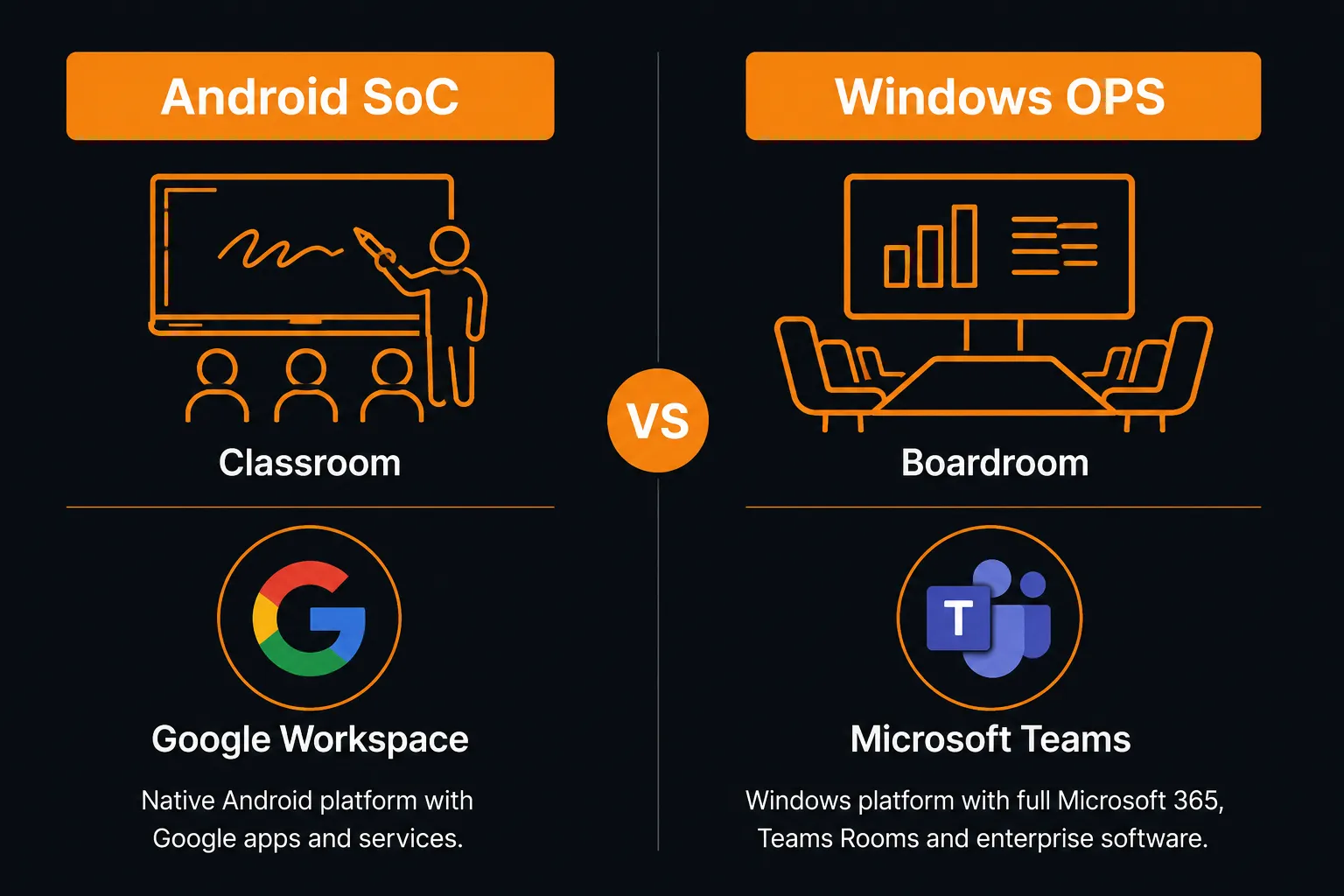
One of the most significant commercial deployment decisions for interactive whiteboards is whether the display relies on an integrated Android SoC (System on Chip) platform or a Windows OPS (Open Pluggable Specification) computing module. This choice directly influences software compatibility, collaboration workflows, conferencing integration, and long-term deployment flexibility.
Many buyers researching interactive whiteboards focus primarily on screen size and touch technology — but the computing platform powering the display is often what determines whether the system integrates successfully into an existing IT environment.
Android SoC Platforms
- Integrated computing — no external hardware required
- Faster startup times and simplified daily operation
- Strong Google ecosystem integration
- Google EDLA certification supports native Google Play Store access
- Access to Android collaboration and whiteboarding applications without external PCs
- Lower deployment cost and reduced hardware complexity
- Well suited to classroom, training, and lightweight collaboration environments
- More limited long-term hardware upgrade flexibility compared to modular OPS systems
- Limited Windows software compatibility
Windows OPS Environments
- Full Windows computing environment within the display
- Native Microsoft Teams Rooms and Zoom Rooms support
- Enterprise software compatibility and IT integration
- Supports enterprise device management, provisioning, and account control
- Greater long-term upgradeability — OPS module can be replaced independently
- Supports advanced enterprise workflows and security management
- Well suited to boardrooms, government, and enterprise collaboration
- Higher deployment cost and increased infrastructure complexity
As a general commercial guideline, Android SoC platforms commonly suit education environments, training rooms, and lightweight collaboration deployments where simplicity, Google ecosystem integration, and cost efficiency are the primary priorities. Windows OPS environments are more commonly suited to enterprise boardrooms, government deployments, and advanced conferencing rooms where full software compatibility, Teams Rooms integration, and IT manageability are essential.
Some commercial deployments may also operate hybrid environments — using Android SoC displays across general collaboration spaces while deploying Windows OPS systems within dedicated conferencing and executive meeting rooms depending on workflow requirements.

Interactive Whiteboards Across Commercial Environments
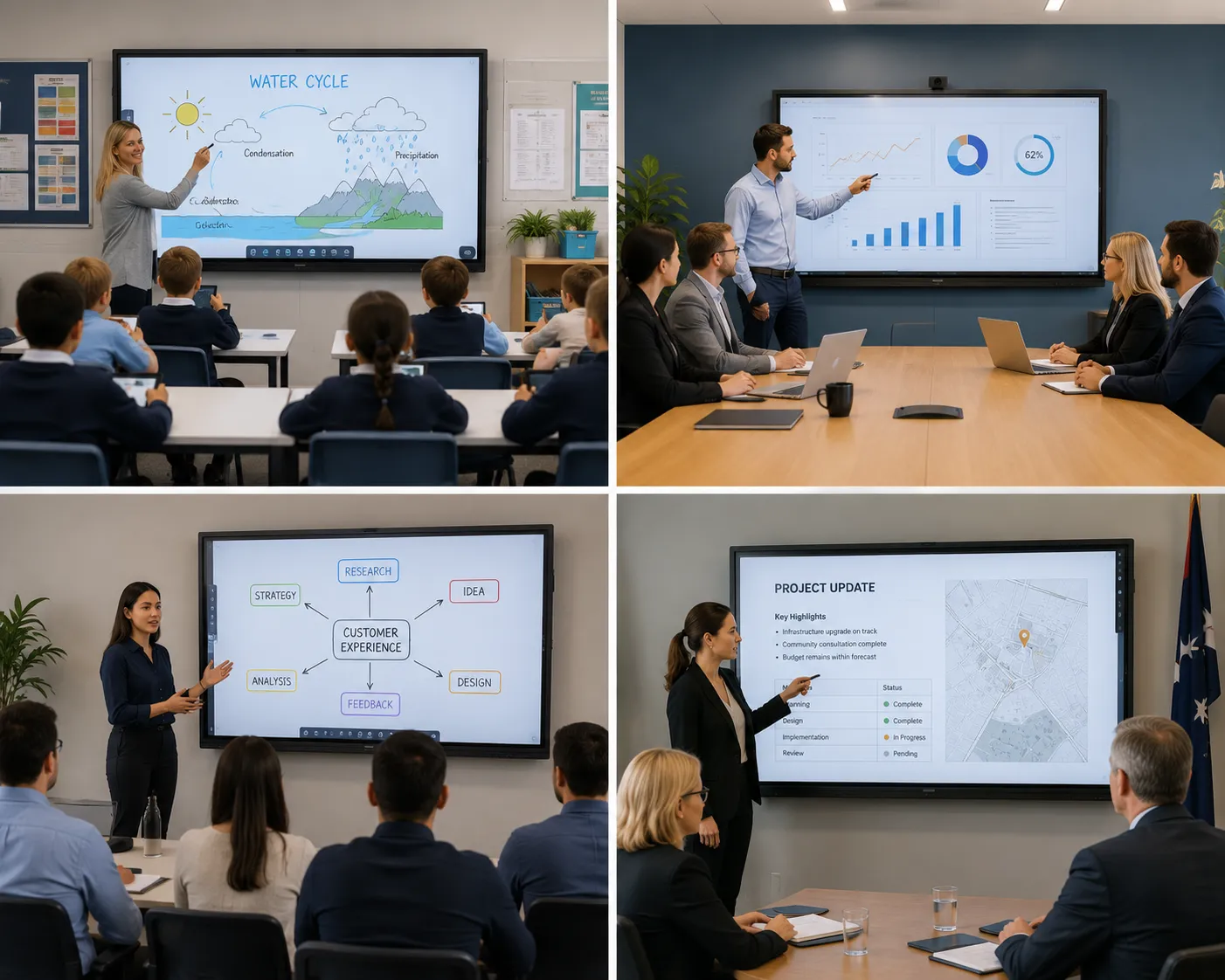
Interactive whiteboard deployments can vary significantly depending on the operational environment, audience interaction requirements, collaboration workflows, and long-term software ecosystem planning. What works well in a primary school classroom may be entirely unsuited to an enterprise boardroom — and vice versa.
Understanding how deployment priorities differ across environments can help organisations identify the right platform before committing to a rollout.
| Environment | Common Priorities | Typical Deployment Focus | Common Platform Direction |
|---|---|---|---|
| Classrooms & Education |
Writing experience Student engagement Multi-user annotation Durability |
Daily annotation and lesson delivery Multi-student interaction Classroom software ecosystems |
SMART Board Promethean Samsung Flip Pro |
| Corporate Boardrooms |
Conferencing integration Wireless presentation Audio performance Teams Rooms support |
Hybrid meetings Executive presentations Enterprise collaboration |
Yealink MeetingBoard Windows OPS deployments ViewSonic ViewBoard |
| Training Rooms |
App flexibility Multi-user interaction Collaboration capability Content delivery |
Interactive learning Presenter-led sessions Group collaboration |
EDLA Android displays Samsung Flip Pro ViewSonic ViewBoard |
| Government & Enterprise |
Reliability Fleet management Windows compatibility Security management |
Multi-site deployments IT-managed environments Advanced conferencing |
Windows OPS deployments Teams Rooms systems Centrally managed collaboration platforms |
| Healthcare |
Hygiene capability Reliability Accessibility Simplified operation |
Clinical communication Patient-facing information Staff collaboration | Simplified collaboration systems with durable commercial construction and hygiene-focused design |
Many organisations find that a single display platform rarely suits every environment across a facility. Larger deployments commonly benefit from evaluating collaboration requirements room by room — identifying where writing experience, conferencing integration, or simplified operation should take priority before selecting a platform.

Interactive Whiteboard Ecosystems — Brand & Platform Positioning
Commercial interactive whiteboards are not a single product category — they span several distinct ecosystems, each engineered with different priorities, software environments, and deployment strengths. Understanding where each platform excels can help organisations select the right ecosystem before investing in a rollout.
Samsung Flip WMFX
Samsung's current-generation premium interactive whiteboard platform — continuing the Flip writing philosophy with refined digital ink processing, low touch latency and a meeting-room optimised annotation experience designed for enterprise collaboration and facilitated training environments.
- Premium annotation and writing performance
- Low touch latency for natural daily use
- Pressure-sensitive stylus capability
- 29% brighter than the previous Flip Pro WMB generation
- Well suited to boardrooms, training rooms and enterprise collaboration
Samsung WAFX-P
Samsung's current-generation Android-powered education and collaboration interactive display — Google EDLA certified with a built-in 48MP camera, 10-metre microphone array and dual 20W speakers. Designed as a parallel ecosystem to the Flip WMFX, optimised for classroom-scale multi-user interaction and Google Workspace for Education environments.
- Google EDLA certified — full Google Play and Workspace access
- Built-in 48MP auto-framing camera and 10m microphone array
- 40-point multi-touch on Android — 50-point via Windows OPS
- Android 15 with Octa-core CPU and 128GB storage
- Well suited to classrooms, education campuses and hybrid learning environments
SMART Board
One of the most established education-focused interactive display ecosystems, with a strong software platform built specifically for classroom engagement, student participation, and multi-user collaboration.
- Education-focused collaboration software ecosystem
- Multi-user classroom interaction capability
- GX, MX, and RX series spanning entry to advanced deployments
- RX Series includes integrated environmental sensors
- Well suited to schools and education departments
Promethean
A long-established education technology ecosystem with a strong focus on classroom engagement, digital learning workflows, and multi-user interactive collaboration environments.
- Education-first collaboration platform
- Strong classroom engagement software
- Multi-user interaction capability
- Well suited to large classroom deployments
- Widely deployed across schools, TAFEs and education departments Australia-wide
Yealink MeetingBoard
An integrated all-in-one collaboration system designed specifically for Microsoft Teams Rooms environments, combining a touchscreen display, conferencing camera, beamforming microphones, and premium audio into a single unified platform.
- Native Microsoft Teams Rooms certification
- Integrated 4K conferencing camera with AI framing
- Beamforming microphone array and premium audio
- Unified conferencing and collaboration in one system
- Well suited to corporate boardrooms and enterprise meeting rooms
ViewSonic ViewBoard
A versatile commercial collaboration platform with a strong focus on audio performance, mature collaboration software ecosystems, and flexible deployment across corporate, training, and education environments.
- Strong onboard audio systems — reduces need for external speakers
- Balanced commercial feature sets across display sizes
- Mature collaboration software ecosystem
- Well suited to training rooms and corporate meeting spaces
- Competitive commercial pricing across the range
Hisense GoBoard
A strong value-focused commercial interactive display with integrated conferencing camera capability, Google EDLA Android certification, and native Google Play Store access — making it an attractive all-in-one option for hybrid meeting environments.
- Integrated 4K conferencing camera
- Google EDLA Android 14 certification
- Native Google Play Store access
- Strong value proposition for hybrid meeting deployments
- Well suited to cost-conscious commercial organisations prioritising Android flexibility
Organisations comparing specific collaboration ecosystems can also explore our dedicated commercial comparison guides covering Samsung Flip WMFX vs WAFX-P, SMART Board GX vs MX vs RX Series, ViewSonic vs Hisense, and other enterprise collaboration platforms in greater detail.

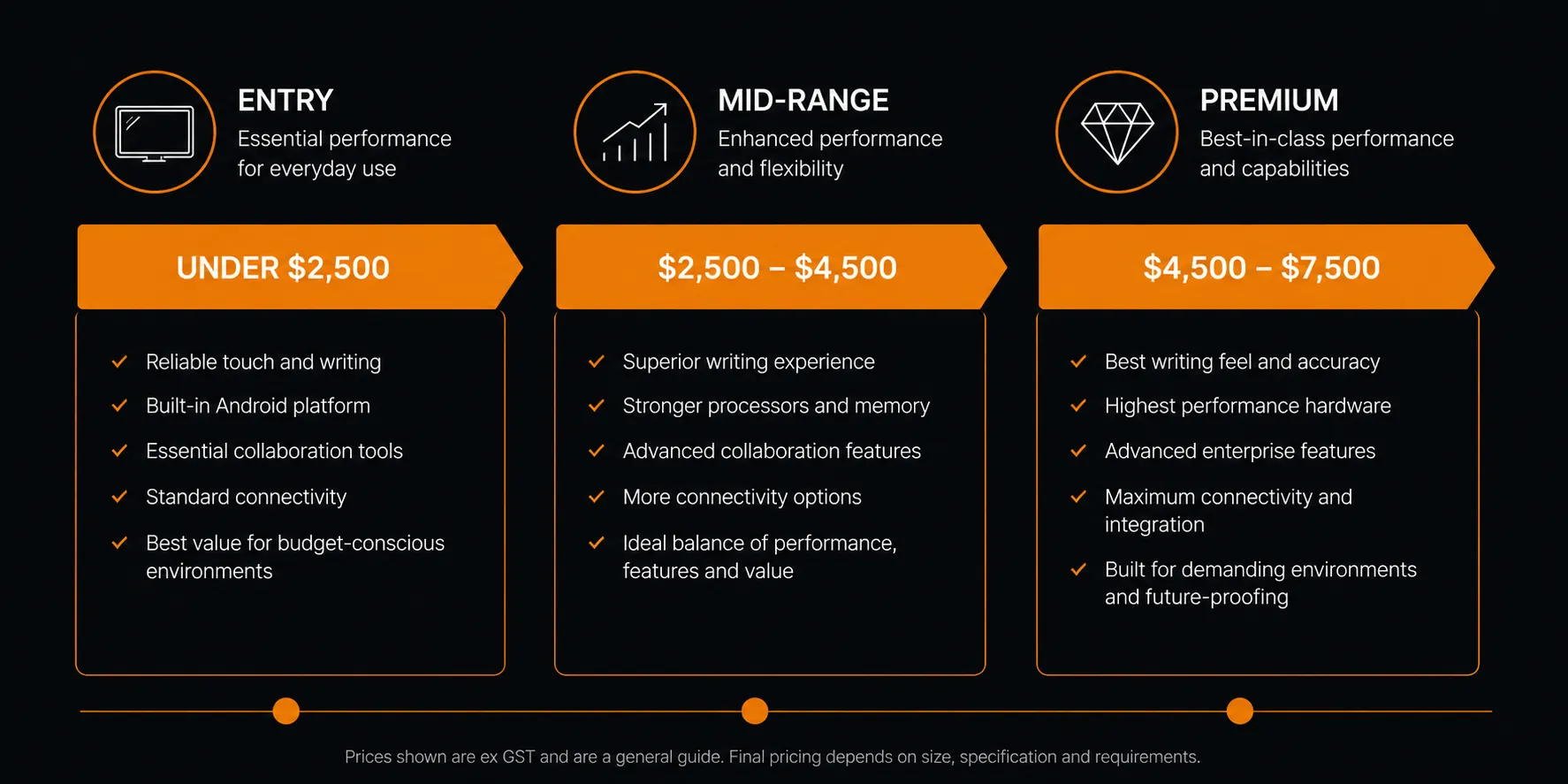
Why Interactive Whiteboard Prices Vary So Much
One of the most common questions organisations ask when researching interactive whiteboards is why two displays that appear almost identical online can differ by thousands of dollars. The answer is rarely found in the specification sheet — it's found in where the engineering investment has actually gone.
A display featuring 4K resolution, Android operating system, and multi-touch support at a budget price point and a premium commercial platform sharing the same headline specifications can feel and perform completely differently in daily use. The difference typically comes down to the quality of components, software depth, and commercial engineering that specification sheets simply don't capture.
Where Premium Interactive Whiteboard Investment Commonly Goes
- Glass bonding systems — bonded glass construction significantly improves writing precision and reduces the parallax effect that makes cheaper displays feel disconnected
- Digital ink engines and firmware — premium platforms invest heavily in stroke prediction, latency reduction, and writing smoothness that defines the real-world annotation experience
- Touch input sampling rate — higher-grade touch sampling improves responsiveness and reduces perceived lag during daily annotation and collaboration
- Commercial audio systems — premium displays invest in onboard speaker quality and beamforming microphone capability that can eliminate the need for separate conferencing hardware
- Anti-glare and anti-microbial glass treatments — important for classroom, healthcare, and public-facing environments where visibility and hygiene are operational priorities
- Commercial operating ratings — higher-grade panels are engineered for extended daily operating hours, improving long-term reliability in education and enterprise environments
- Enterprise collaboration ecosystems — premium platforms often include more mature collaboration software, remote management capability, and long-term firmware support
- Commercial warranty and support — enterprise-grade warranties and Australian commercial support coverage represent genuine long-term value that budget displays rarely match
Downtime across classrooms, meeting rooms, or training environments can rapidly outweigh initial hardware savings. Displays that feel poor to write on, develop reliability issues, or become software-unsupported early in their lifespan can generate significantly higher operational costs than the original price difference suggested.
As a general commercial guideline, the total cost of ownership across a five to ten year deployment often reflects the initial investment difference more accurately than the upfront purchase price alone.

Remote Management & Enterprise Deployment Scalability
For organisations deploying interactive whiteboards across multiple classrooms, campuses, meeting rooms, or business locations, remote management capability can be one of the most operationally valuable features to evaluate — yet it's one of the most frequently overlooked during the initial procurement process.
Managing ten displays is straightforward. Managing fifty or hundreds across multiple sites without centralised management tools can quickly become a significant operational burden for IT departments and facility managers alike.
Centralised Content & Software Management
Centralised management ecosystems allow IT administrators to push software updates, manage installed applications, control firmware deployments, and configure displays across an entire fleet from a single environment — without visiting each device individually.
Device Monitoring & Health Reporting
Enterprise-grade management ecosystems commonly support real-time device monitoring, automated health reporting, and uptime tracking — allowing IT teams to identify and address issues before they cause operational disruption.
Remote Troubleshooting & Support
Remote access capability allows support teams to diagnose and resolve display issues without requiring on-site visits, significantly reducing response times and operational downtime across education and enterprise environments.
Scheduling & Power Management
Centralised scheduling systems allow organisations to automate display power cycles, reduce energy consumption outside operating hours, and manage display availability across facilities without manual intervention.
Account & Security Management
Enterprise deployments commonly require integration with existing identity management systems, user account provisioning, and security policy enforcement — capabilities that vary noticeably between commercial display platforms.
Multi-Site Deployment Consistency
Centralised management platforms help ensure consistent display configurations, firmware standardisation, software versions, and operational policies are maintained across multiple locations — reducing version fragmentation and long-term support complexity.
As a general commercial guideline, organisations deploying five or more interactive displays across a facility or multiple locations commonly benefit from evaluating remote management capability as a primary procurement consideration — not an afterthought. The operational savings across a large deployment can significantly outweigh any additional platform investment.

Hygiene, Durability & Commercial Build Quality
In public-facing, education, and healthcare environments, the physical build quality of an interactive whiteboard matters as much as its software ecosystem. Displays in these environments are touched by dozens or hundreds of different users daily — and the long-term hygiene, durability, and structural integrity of the display surface directly influences operational reliability and user confidence.
This is an area where the difference between consumer-grade and genuinely commercial-grade interactive displays becomes significantly more noticeable over time. Budget displays engineered for light domestic use can deteriorate noticeably under the demands of daily classroom, healthcare, or public interaction environments.
Commercial Build Quality Considerations for High-Use Environments
- Anti-microbial surface coatings — specialist coatings that inhibit bacterial growth on the display surface, increasingly important for healthcare, education, and public-facing deployments where hygiene standards are an operational requirement
- Tempered safety glass — commercial-grade tempered glass provides significantly improved impact resistance compared to standard display glass, reducing the risk of surface damage in high-traffic environments
- 7H hardness-rated glass surfaces — a glass hardness rating commonly specified in commercial interactive displays designed for heavy daily use, offering meaningful scratch and surface wear resistance over long deployment periods
- Commercial operating hour ratings — commercial panels are commonly rated for 16 to 24 hours of daily operation, compared to consumer displays typically rated for 8 hours — an important distinction for environments where displays run continuously throughout the day
- Vandal resistance and structural integrity — public-facing and education deployments may benefit from displays engineered with reinforced bezels and mounting systems designed to withstand incidental impact and heavy daily interaction
- Sealed port and cable management design — commercial displays with thoughtfully engineered port placement and cable management reduce tampering risk and improve long-term reliability in classroom and public environments
Surface damage and reliability issues in high-use environments can create significant operational downtime and replacement costs over the lifespan of a deployment. Healthcare environments in particular increasingly specify anti-microbial surface treatments and simplified cleaning protocols as formal procurement requirements — rather than optional features. For education and public-facing deployments, tempered glass durability and commercial operating ratings are among the most important long-term reliability considerations.

Interactive Whiteboard Deployment Planning & Considerations
Successful interactive whiteboard deployments commonly depend on far more than selecting the right display. The physical environment, room acoustics, network infrastructure, mounting requirements, and operational workflows all influence whether a collaboration system performs as intended once installed.
Many deployment challenges that emerge after installation could have been identified and addressed during the planning phase — making pre-deployment evaluation one of the most valuable investments an organisation can make before committing to a platform rollout.
| Deployment Consideration | Why It Matters | Common Commercial Impact |
|---|---|---|
| Wall Reinforcement & Mounting | Large commercial displays can exceed 70–90kg. Standard wall construction may require reinforcement before installation. | Inadequate mounting infrastructure can delay installation, increase costs, and create long-term safety risks. |
| Room Acoustics & Audio | Room size, ceiling height, and surface materials significantly influence how onboard microphones and speakers perform during hybrid meetings and conferencing. | Poor room acoustics can undermine conferencing quality regardless of display audio specifications — external acoustic treatment or supplementary audio equipment may be required. |
| Network Infrastructure | Wireless presentation, cloud collaboration, Teams Rooms, and remote management all depend on stable, high-bandwidth network connectivity. | Insufficient network infrastructure is one of the most common causes of inconsistent collaboration performance post-deployment. |
| Mounting Height & Accessibility | Display mounting height directly influences usability for different user groups — particularly in classroom environments where students of different ages interact with the display. | Incorrect mounting height reduces engagement, increases user fatigue, and can create accessibility compliance issues in some environments. |
| Cable Management | Professional cable management improves long-term reliability, reduces tampering risk, and contributes to a clean installation that reflects positively on the deployment. | Poor cable management is a common source of connectivity issues, display downtime, and increased maintenance requirements over time. |
| OPS vs Android Planning | The computing platform selected at deployment determines future software flexibility, upgrade pathways, and IT integration capability. | Platform mismatches discovered after deployment can require costly hardware replacements rather than simple software updates. |
| Future Scalability | Organisations planning to expand interactive whiteboard deployments benefit from selecting platforms that support centralised management, consistent firmware, and scalable licensing from the outset. | Deploying incompatible platforms across different rooms or sites creates fragmented management environments that increase IT complexity and long-term support costs. |
Organisations planning larger interactive whiteboard rollouts across multiple rooms or sites are welcome to contact Kickstart Computers for commercial deployment consultation Australia-wide — including pre-deployment environment assessment, platform recommendations, and installation planning support.

Interactive Whiteboard Comparison Guides
Selecting the right interactive whiteboard platform often comes down to understanding how specific ecosystems compare in real-world deployment scenarios. Our dedicated comparison guides explore the key differences between leading commercial collaboration platforms — covering writing experience, software ecosystems, conferencing capability, deployment suitability, and long-term value.
Samsung Flip WMFX vs WAFX-P
A comparison of Samsung's two current-generation interactive display platforms — exploring how the enterprise-focused Flip WMFX and the education-focused Android WAFX-P differ in interaction philosophy, writing experience, software ecosystem and deployment priorities.
Read the Full Comparison →Samsung Flip Pro WMB vs Flip WMFX
An in-depth look at what changed between the Samsung Flip Pro WMB generation and the newer Flip WMFX — covering brightness improvements, platform evolution, and what the upgrade means for organisations currently running Flip Pro deployments.
Read the Full Comparison →Samsung Flip Pro vs WAD eBoard
An in-depth comparison of two Samsung interactive display platforms — exploring why the Flip Pro feels materially different to write on despite sharing similar headline specifications with the WAD series.
Read the Full Comparison →SMART Board GX vs MX vs RX Series
A structured breakdown of the SMART Board education display range — covering the key differences between entry, mid-range, and advanced series deployments across classroom and education environments.
Read the Full Comparison →Samsung Flip Pro vs Yealink MeetingBoard
A comparison of two premium commercial collaboration platforms — exploring how annotation-focused and conferencing-focused interactive displays differ in enterprise and hybrid meeting environments.
Read the Full Comparison →ViewSonic vs Hisense Interactive Displays
A practical comparison of two commercially focused collaboration platforms — exploring where ViewSonic's audio investment and Hisense's integrated conferencing capability suit different deployment priorities.
Read the Full Comparison →Promethean vs SMART Board
A comparison of two of the most established education-focused interactive display ecosystems — exploring software depth, classroom engagement capability, and long-term deployment suitability across school environments.
Read the Full Comparison →Android SoC vs Windows OPS Deployments
A detailed exploration of the two primary computing platforms powering commercial interactive displays — helping organisations understand which environment best suits their software ecosystem, IT infrastructure, and collaboration workflows.
Read the Full Comparison →Additional comparison resources and commercial buying guides are available across the Kickstart Computers knowledge base — covering collaboration ecosystems, deployment strategy, commercial installation planning, and interactive whiteboard technologies in greater detail.
Compare Interactive Whiteboard Manufacturers
Interactive whiteboards are available across several distinct commercial ecosystems — each engineered with different priorities for writing experience, collaboration software, conferencing integration, and deployment environment. Exploring how each manufacturer approaches the interactive whiteboard category can help identify the right platform before committing to a rollout.
Samsung Interactive Displays
Samsung offers two distinct interactive whiteboard ecosystems — the Flip WMFX, engineered for premium annotation and enterprise boardroom collaboration, and the WAFX-P, a Google EDLA certified Android platform designed for classroom-scale multi-user interaction and Google Workspace environments.
Explore Samsung →BenQ Interactive Displays
BenQ's interactive flat panel range is a core competitor in the commercial IWB market — covering education, corporate, and training environments with a strong focus on eye-care technology, germ-resistant surfaces, and collaboration software depth across the Board and RP series.
Explore BenQ →LG Interactive Displays
LG's CreateBoard range brings the brand's commercial display engineering into the interactive whiteboard category — combining LG's panel quality with Android-based collaboration capability across education, training, and corporate environments where display performance and reliability are priorities.
Explore LG →Sharp Interactive Displays
Sharp's AQUOS Board range enters the interactive whiteboard category with the commercial display engineering credentials of a professional AV manufacturer — suited to corporate and enterprise environments where display build quality, reliability, and long-term commercial support are central procurement considerations.
Explore Sharp →
What is an interactive whiteboard?
An interactive whiteboard is a large-format commercial touchscreen display that allows users to interact directly with digital content using touch, stylus annotation, wireless presentation, and real-time collaboration tools — rather than simply viewing content passively.
Modern commercial interactive whiteboards now operate as connected collaboration ecosystems supporting:
- real-time annotation
- hybrid meetings
- Microsoft Teams and Zoom conferencing
- wireless content sharing
- cloud collaboration
- multi-user touchscreen interaction
These systems are commonly deployed across:
- education
- corporate boardrooms
- training environments
- government
- healthcare
- enterprise collaboration spaces
What is the difference between an interactive whiteboard and a standard commercial display?
A standard commercial display is primarily designed for passive content delivery such as:
- digital signage
- advertising
- announcements
- information broadcasting
An interactive whiteboard is specifically engineered for:
- touchscreen interaction
- stylus annotation
- wireless collaboration
- hybrid meetings
- multi-user engagement
- real-time communication workflows
Interactive whiteboards additionally support:
- collaboration software ecosystems
- Android or Windows OPS computing environments
- Microsoft Teams and Zoom integration
- remote management capability
- digital ink and touch technologies
Why do some interactive whiteboards feel better to write on than others?
Two interactive whiteboards sharing almost identical specifications can feel dramatically different once someone begins writing on them.
The real-world writing experience is influenced by factors that rarely appear clearly on specification sheets, including:
- glass bonding technology
- touch latency
- touch polling rate
- digital ink processing
- firmware optimisation
- pressure-sensitive stylus capability
- palm rejection systems
Premium commercial displays commonly use bonded glass construction, reducing the distance between the display surface and LCD panel. This creates a more connected and natural writing feel with reduced parallax.
Displays using traditional air-gap infrared systems may feel slightly less precise during annotation even when headline specifications appear similar.
What is touch latency and why does it matter?
Touch latency is the delay between a stylus or finger touching the screen and the digital ink appearing visually on the display.
Premium commercial interactive displays commonly target sub-10ms touch latency to help annotation feel immediate and natural.
Higher latency can create:
- visible delay while writing
- disconnected stylus feel
- increased fatigue during long annotation sessions
- less natural handwriting response
This is one of the most noticeable real-world differences between:
- premium collaboration displays
and - budget interactive whiteboards
What is the difference between PCAP and IR touch technology?
Projected Capacitive (PCAP)
PCAP technology uses a capacitive sensing layer embedded within the display glass, delivering:
- highly responsive touch interaction
- smooth gesture control
- smartphone-like touch accuracy
- refined writing feel
PCAP is commonly used in:
- premium collaboration displays
- retail kiosks
- enterprise touchscreen systems
Infrared (IR)
IR touch systems use infrared sensors around the display bezel to detect touch input.
IR technology is widely used because it:
- supports large display sizes
- allows multi-user interaction
- offers lower commercial pricing
However, the writing experience can vary considerably depending on:
- glass bonding quality
- air gap distance
- firmware optimisation
- touch processing quality
What is the difference between Android SoC and Windows OPS systems?
Android SoC (System on Chip)
Android SoC systems integrate the computing hardware directly inside the display.
Advantages commonly include:
- faster startup
- simplified deployment
- lower hardware complexity
- Google ecosystem integration
- reduced cable requirements
These environments are commonly suited to:
- classrooms
- training rooms
- lightweight collaboration spaces
Windows OPS (Open Pluggable Specification)
Windows OPS systems use modular Windows computing modules installed directly into compatible displays.
Advantages commonly include:
- native Microsoft Teams Rooms support
- Zoom Rooms compatibility
- enterprise software integration
- greater long-term upgrade flexibility
- stronger IT management capability
OPS environments are commonly preferred for:
- boardrooms
- government
- enterprise collaboration environments
- advanced conferencing deployments
Do interactive whiteboards support Microsoft Teams Rooms?
Yes — select commercial interactive whiteboards are certified for Microsoft Teams Rooms deployments.
The Yealink MeetingBoard is one of the most widely deployed all-in-one Teams Rooms collaboration platforms, combining:
- interactive touchscreen display
- 4K conferencing camera
- AI framing
- beamforming microphones
- integrated audio
into a single unified collaboration system.
Windows OPS-powered displays can also support:
- Microsoft Teams Rooms
- Zoom Rooms
- enterprise conferencing platforms
when deployed with appropriate hardware and licensing.
Android-based displays may support the Teams application itself, but not always the full certified Teams Rooms experience available through dedicated conferencing platforms.
What is the best interactive whiteboard for classrooms?
The best classroom interactive whiteboard depends on:
- teaching workflows
- software ecosystem preference
- annotation requirements
- classroom size
- deployment budget
As a general commercial guideline:
- SMART Board and Promethean are widely regarded as leading education-focused ecosystems with strong classroom engagement software
- Samsung Flip Pro is highly regarded for its premium writing experience and natural annotation feel
- Samsung WAD eBoard is commonly selected for value-focused classroom rollouts where budget is a major consideration
The ideal platform often depends on:
- year level
- teacher workflow
- existing software platforms
- deployment scale
What is the best interactive whiteboard for hybrid meetings and boardrooms?
Boardroom and hybrid meeting environments commonly prioritise:
- conferencing integration
- audio quality
- wireless presentation
- camera systems
- enterprise software compatibility
As a general commercial guideline:
- Yealink MeetingBoard is widely regarded as one of the strongest all-in-one Teams Rooms collaboration platforms available
- ViewSonic ViewBoard offers strong onboard audio and mature collaboration capability for corporate environments
- Windows OPS deployments provide the greatest enterprise software flexibility and conferencing compatibility
The best deployment often depends on:
- Teams vs Zoom ecosystems
- IT management requirements
- room size
- conferencing complexity
- long-term upgrade planning
Can interactive whiteboards be remotely managed?
es. Most modern commercial interactive whiteboards support centralised remote management platforms allowing IT teams to:
- deploy firmware updates
- push software updates
- configure display settings
- monitor device health
- troubleshoot systems remotely
- manage multiple displays across sites
Remote management becomes especially important for:
- schools
- universities
- enterprise meeting room fleets
- government deployments
- multi-site organisations
Without centralised management capability, large deployments can become operationally difficult and expensive to maintain over time.
How long do commercial interactive whiteboards typically last?
Commercial-grade interactive whiteboards are engineered for significantly longer operational lifespans than consumer-grade touchscreen products.
Most commercial platforms commonly provide:
- 3–5 year manufacturer warranties
- 7–10 year operational lifespan expectations
depending on:
- usage intensity
- operating environment
- maintenance quality
- deployment conditions
Commercial displays are also commonly rated for:
- 16–24 hours daily operation
compared to many consumer displays rated for approximately:
- 8 hours daily operation
This distinction becomes extremely important in:
- classrooms
- public-facing environments
- healthcare
- enterprise meeting spaces
What should organisations consider before deploying interactive whiteboards?
Successful interactive whiteboard deployments depend on considerably more than display specifications alone.
Key considerations commonly include:
- writing experience and touch technology suitability
- Android SoC vs Windows OPS requirements
- collaboration software ecosystem compatibility
- Microsoft Teams and Zoom integration
- room acoustics and conferencing audio performance
- wall reinforcement and mounting infrastructure
- network infrastructure capability
- remote management and fleet scalability
- hygiene and durability requirements
- firmware support and upgrade pathways
- long-term operational reliability
- deployment scalability across multiple rooms or sites
Many deployment challenges discovered after installation can often be avoided through proper pre-deployment planning and ecosystem evaluation beforehand.
Need Help Choosing the Right Interactive Whiteboard?
Whether you are researching Samsung Flip Pro writing experience, SMART Board classroom ecosystems, Yealink MeetingBoard Teams Rooms deployments, Promethean education platforms, ViewSonic collaboration environments, or Hisense GoBoard hybrid meeting systems — Kickstart Computers can help recommend the right collaboration platform for your environment, workflows, and long-term deployment goals.
Since 2007 we have supplied commercial interactive whiteboard and collaboration display solutions across Australian education, corporate, government, healthcare, and enterprise environments.
If you are also researching the broader commercial display landscape — including digital signage, video walls, outdoor displays, and interactive kiosks — our digital signage hub covers every commercial display solution available Australia-wide.